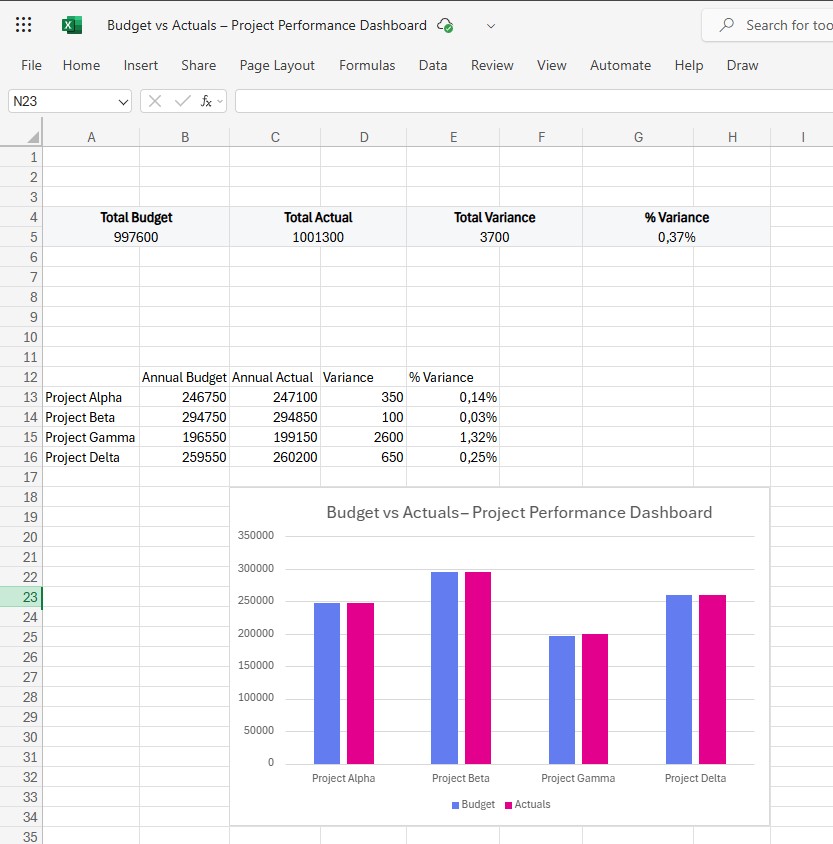
A clean, professional Excel dashboard that gives you instant clarity into how four key business projects are performing against their budgets. Built with formulas only — no macros, no Power Query, no setup required.
Managing project financials shouldn’t require complex reporting software. The Project Budget vs Actuals Mini Dashboard brings everything you need into a single, easy-to-read Excel view. Compare Budget vs Actual performance across four projects, track financial variance, and visualize performance trends with a polished chart — all automatically updated when you paste in your data.
This lightweight dashboard is perfect for managers, teams, and business owners who need fast, reliable insights without complicated tools.
Who This Dashboard Is For
- Project managers
- Business owners and founders
- Finance teams
- PMO departments
- Agencies and consulting teams
- Anyone managing multiple project budgets in Excel
What’s Inside
Your download includes a fully built dashboard with everything you need to track and visualize project performance.
1. Budget vs Actuals Chart (Per Project)
A clean, modern clustered column chart showing:
- Budget
- Actual
- Variance visibility at a glance
Perfect for reviews, presentations, and board meetings.
2. KPI Summary Cards
At the top of the dashboard, four KPI cards provide a fast financial snapshot:
- Total Budget (All Projects)
- Total Actual Spend
- Total Variance (Actual – Budget)
- % Variance
These update instantly when your data changes.
3. Project Summary Table
A clear breakdown of annual performance per project:
- Annual Budget
- Annual Actual
- Variance
- % Variance
Ideal for comparing which projects are on track vs overspending.
4. Data Sheet (Editable)
Includes:
- 12 months × 4 projects
- Budget
- Actual
- Clean tabular structure, ready for real-world data
Replace the sample numbers with your own — the dashboard updates automatically.
Key Features
- 100% formula-based (no VBA, no macros, no Power Query)
- Lightweight and fast — perfect for everyday use
- Beautiful modern layout designed for ExcelMiniDashboard.com
- Ready-made KPIs, charts, and summary visuals
- Works with Excel 2021 and Excel for Microsoft 365
- Beginner-friendly but powerful enough for professionals
- Instantly updates when data is replaced
Pricing
€0 — Introductory Launch Price
(First-time visitors get early access pricing)
Instant Download & Easy Setup
Just download → open → paste in your data — the entire dashboard updates automatically. No configuration required.
License
- Use for personal or business reporting
- Not for resale, redistribution, or template repackaging
 Excel Mini Dashboard